 Search Tips
How to upgrade firmware
Before upgrading firmware, ensure the battery level is not low, and the wheelchair is in a safe and stable state – for example, place it on blocks to elevate it from the ground.
DO NOT upgrade firmware when the wheelchair is on a slope, or when the park brakes are disengaged.
To access the module firmware upgrade screen:
-
Ensure the system is in connection context.
-
Click the Home menu item in the navigation sidebar.
-
Click the System Summary button.
The system summary displays each module with its firmware status:
-
A white arrow on a blue background indicates the firmware is out-of-date and an upgrade is available
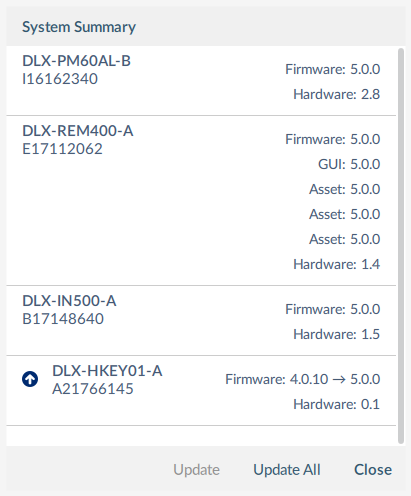
System summary screen
Firmware can be upgraded on modules individually or all at once. To upgrade individually:
-
Select a single module and click the Update button.
To update all at once:
-
Click Update All.