How to connect the LiNX Access iOS tool to a LiNX Access Key (LAK)


This article shows you how to connect the LiNX Access iOS tool with a LiNX Access Key (LAK).


To connect the LiNX Access iOS tool to a LAK:

  1. Power up a LiNX wheelchair system.

  2. Insert the LAK into the remote module's XLR port.

  3. Open the LiNX Access iOS tool application.

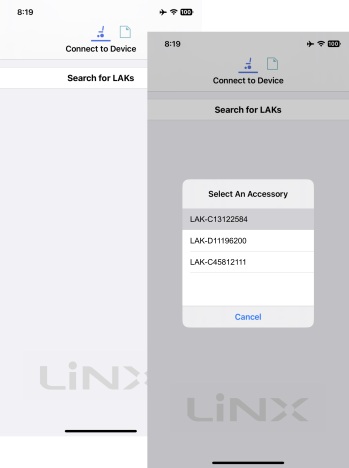
  4. From the top of the screen, select the connection context button:

  5. Tap the Search for LAKs button and select a LAK from the Select an Accessory list.
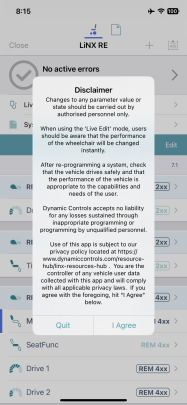
    A disclaimer notification displays.

  6. Read the notification message and tap I Agree to continue.


NOTE If the list of available devices takes a long time to populate when you tap on Search for LAKs, you may be able to speed the process up by removing the number of previously used devices that appear in your iOS device's Bluetooth list My Devices.

To remove devices from My Devices:

  1. from your iOS device's home screen, go to Settings → Bluetooth

  2. tap on a device under My Devices

  3. tap on Forget This Device

  4. repeat 1) to 3) for each device under the My Devices heading.