 Search Tips
How to store the Access Level Certificate (LAiOS)
The Access Level Certificate determines how you view and edit offline programs (*.lci files) when in file context. If you do not store your certificate, you will have read-only access to your stored .lci files.
The certificate is taken from a connected LiNX Access Key and provides access to your files on one of two levels:
-
Distributor – access to a limited number of parameters
-
Manufacturer – access to all parameters
To edit files with distributor's access requires an Access Level Certificate from a distributor-level LiNX Access Key (DLX-HKEY01-A).
To edit files with manufacturer's access requires an Access Level Certificate from a manufacturer-level LiNX Access Key (DLX-HKEY02-A).
To store an Access Level Certificate:
-
Connect to a LiNX system.
-
Tap the Application menu button.

-
Select Store Authorisation‡1.
-
Tap Store to continue‡2 or Don't Store to cancel.
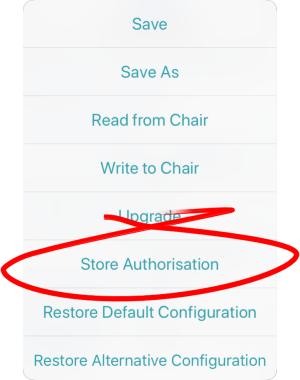
After storing a certificate, you can edit your stored files.
Notes
‡1 A message displays showing how many authorisations remain and asks if you want to continue. LiNX Access Keys only permit ten Store Authorisation operations. Once ten authorisations have occurred, the menu item is greyed out.
‡2 If the LiNX Access iOS tool application is removed from your iOS device, the Access Level Certificate will be lost.
Once a certificate has been stored on your iOS device, the access level granted by the stored certificate does not have to be the same as the access level granted by subsequent LiNX Access Keys. You can mix the access levels of LiNX Access Keys and stored Access Level Certificates.
With mixed access levels, the higher level takes precedence when editing parameters. That is, if either the Access Level Certificate or the LiNX Access Key is at manufacturer-level access, you can edit parameters at manufacturer level: a manufacturer's LiNX Access Key (DLX-HKEY02-A) overrides a stored distributor-level certificate, and a stored manufacturer's-level certificate overrides a distributor's LiNX Access Key (DLX-HKEY01-A).