 Search Tips
How to tune Adaptive Load Compensation (ALC)(LAiOS)
Adaptive load compensation (ALC) must be enabled1 before tuning. If it is enabled, follow the steps below to tune it.
To tune the adaptive load compensation:
-
From the Home screen, tap Modules.
-
Tap Power Module.
-
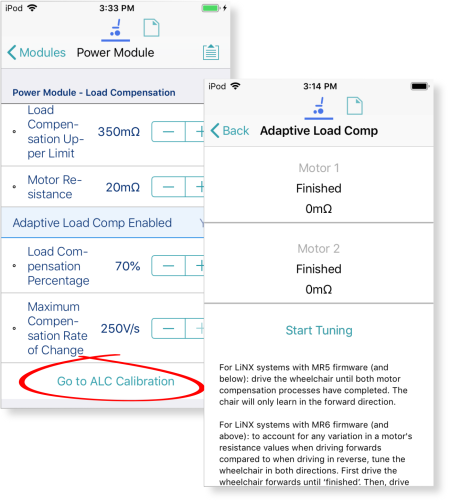
Scroll down to Power Module – Load
Compensation, and tap Go to ALC Calibration. -
Follow the instructions on the screen.
| NOTE |
The motor resistance values that are learnt through this calibration process will be lost and will require recalibrating again when:
Changing any parameters that are not related to load compensation while the system is connected to the LiNX Access tools will not have any impact on the learnt motor resistance value. |