 Search Tips
Editing modes — live edit and bulk edit (LAiOS)
Live edit mode is available in the connection context only — that is, when connected to a wheelchair.
Live edit writes parameter changes immediately to the wheelchair as you enter them. This is useful for quickly setting up or testing.
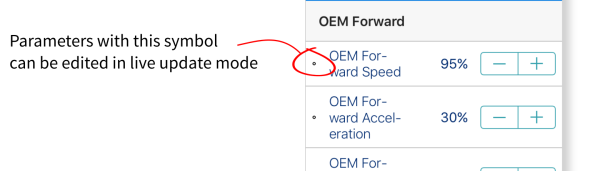
Not all parameters can be updated in live edit mode. parameters that can be updated in live edit are identified by a circular icon to the left of the parameter name.
When in live edit mode, changes to parameters take immediate effect, changing the performance of the wheelchair immediately.
There is no function to undo a change in live edit mode. Before editing, save a copy of the program to use to restore settings, if required.
Bulk edit
Bulk edit parameters are available in connection context and file context.
In bulk edit, all parameters are editable but none are written to the wheelchair immediately. They are written to the wheelchair when the Write function is selected.
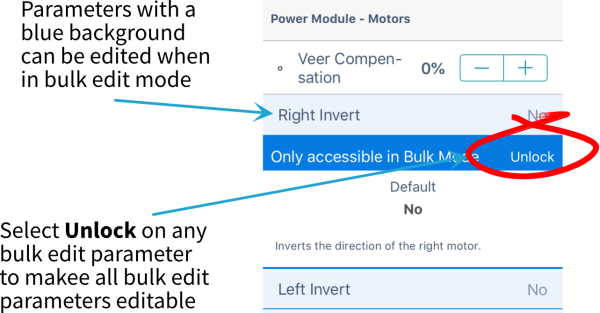
In connection context, bulk edit parameters are identified by a blue background and must be unlocked to be editable. In file context, all parameters are bulk edit parameters.
Bulk edit — connection context
You can unlock bulk edit by opening any bulk edit parameter and tapping Unlock — image below.
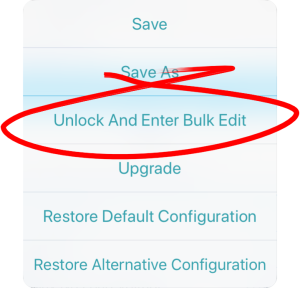
Alternatively, you can tap on the Application Menu button (top-right hand corner ) and select Unlock And Enter Bulk Edit — image below.
When unlocked, the editing mode switches from live edit to bulk edit, and all parameters are editable.
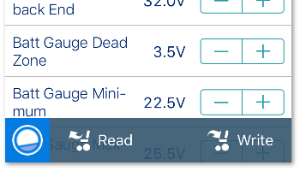
After unlocking bulk edit, the bulk edit icon and read and write options appear at the bottom of the screen.
-
Read power-cycles the system and returns you to live edit, if your program is in sync with the wheelchair. Any edits you have made will be lost.
-
Write writes your edits to the wheelchair, power-cycles the system and returns you to live edit.
Bulk edit — file context
In file context, the read and write functions are available only if a wheelchair is connected to the system. To connect a wheelchair, open a connection in connection context and return to file context to edit the file.
By default, live edit mode is enabled every time the system is powered up, including after a power cycle. The application remains in live edit mode until bulk edit mode is unlocked. At that point, the application changes to bulk edit mode and live edit mode is disabled. The application then remains in bulk edit until the system is written to and power-cycled.