 Search Tips
Status bar
The status bar can be divided into three sections:
-
profile name
-
time
-
status information
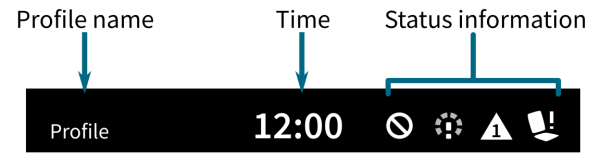
Figure 1: The status bar
Profile name
The profile name is set with a LiNX Access programming and diagnostic tool using Functions | Profile Name.
Time
The time is displayed as a 12 or 24-hour clock. It is set using the coordinated universal time (UTC) and an offset based on the location (country) of the user. The UTC is automatically acquired when a system is connected to a programming and diagnostic tool. The country-based offset is set by the user through the remote module's setting screen.
Status information
The status information displays the current state of the LiNX system with status icons. The icons include: flash codes; Bluetooth disabled; drive slowdown; drive lockout / inhibit; seating lockout. These status icons are explained in Table 1, below.
Table 1: Status information icons
|
Status icon |
Meaning |
|---|---|

|
Drive lockout — This notifies the user that a drive lock-out is active. A drive lock-out is a state that prevents the wheelchair being driven. |

|
Drive slowdown — This notifies the user that a drive slow-down is active. A drive slow-down is a state that prevents the wheelchair being driven at the standard speed for safety reasons. Instead, the wheelchair is allowed to drive at a reduced speed for the duration of the active drive slowdown. |

|
Flash code — This notifies the user that an error is active. The flash code is a value between 1 and 7 (see the LiNX Systems Manual for more information about errors and flash codes) — this flash code is flashed on the status indicator at the same time. |

|
Seating lockout — This notifies the user that a seating lock-out is active. A seating lock-out is a state that prevents the wheelchair's seating being operated. |

|
Bluetooth disabled — This notifies the user that Bluetooth connectivity is disabled. |
Three battery conditions are shown on the right-hand side of the status bar. These are:
-
high voltage
-
low voltage
-
cut-off voltage
These are described in Table 2.
Table 2: Battery conditions shown on the status bar
|
Battery voltage |
Meaning |
|---|---|

|
High voltage — this is displayed when the battery voltage goes above the Batt Gauge High Voltage Warning set-point. |

|
Low voltage — this is displayed when the battery voltage falls below the Batt Gauge Low Voltage Warning set-point. |

|
Cut-off voltage — this is displayed when the battery voltage falls below the voltage set by Cut Off Voltage. This indicates that the battery is empty and battery damage will occur if the battery is discharged any further. The horn also sounds once every ten seconds for the duration that the deep discharge status is active. |